Showing posts with label Reviews. Show all posts

Thursday, March 20, 2014

SoapUI - A powerful web services testing tool

Recently I happened to Review/Test a few web services implemented for one of my client. 
SoapUI Pro

SoapUI is the defacto standard for validating webservices. Apart from technical deliverables, I also got to evaluate the product and compare it with free version. I downloaded free version and Pro (14 days evaluation) and was pleasantly surprised at the advancements and ease of use. I developed webservices a few years ago and hardly any useful tool was there to test it. 

SoapUI Pro interface 


Some of the notable features I liked and used are

  • Dynamic Duo/The Editors - You can visually enter data rather than searching though XML and entering the data. I used this extensively and is a very neat feature. 
  • Point and Click Testing - Almost ready to test the webservices just with few clicks. You can click on the web service response xml contents and right click and few more clicks and SoapUI writes the xpath qeury and associated test case. Its that simple. 
  • Test Debugging - Helps creating test flows, other testing related constructs like conditional execution, looping etc. I mostly utilized connecting to DB (data source) and groovy script.
  • Data Sources - Provides options to connect to most popular data sources. You can write queries/get the data from these sources and then use use the data as part of inputs to your webservice calls or compare the data to validate the webservice response.
  • Multi-Environment Support - If you have multiple environments on which you need to do same webservice testing, this is a major timesaver. I created my own config file and imported those settings as project's properties. Client code, end points. connection string, user name and such commonly used strings were stored and the imported properties could be used in test cases as variables with a few clicks(Again I did not type any of these).
  • Reporting - Provides nice reporting of all test suites/cases executed with their status. You can also customize the template of reporting. I mostly created HTML reports as they were very easy to use and store but PDF, CSV and other formats are also available. 
  • The SQL builder - Sql builder allows you to visually choose the tables and build query, our huge database with few thousand schemas was too much for SoapUI . I preferred using my ready to use queries and it worked flawlessly.
  • Stop the Hackers - XML Bomb, sql injection, malformed XML and plenty of other ready to use test cases are available under security category  - Just few clicks away.  

SoapUI had plenty of other features but these were the features that I ended up using and was pleased with the self explanatory and user friendly interface.
You can take a look at their SoapUI : 12 reasons to go pro page for more details.


SoapUI also has a free version. Free version is very limited but lets you create your test cases with basic features.

Thursday, March 24, 2011

50th Post- Sony HDR-XR150 Full HD 120GB HDD, 25X Optical zoom

My Ex-Neighbor Mr. Ron asked me to suggest him a good handycam for him. Sony was the defacto brand suggestion for him. Other reasons for selecting this model.
  • 1920 x 1080 pixels Full High definition videos
  • It had a large 120GB space to record lots of videos
  • 25X optical zoom. I never had that much of zoom so far in any of my camera/handycams.
  • Other specs like
    • Exmor R" CMOS sensor
    • Smile shutter
    • Face detection
  • 4.5 User review ratings
Not buying a memory card as it doesnt need one, it has 120GB HDD :)
Hope he enjoys it for years to come.

Tuesday, December 14, 2010

Sony TX5 Waterproof, HD

Its time for another camera. Read about my earlier camera review.

My expectations from digital camera have increased over period of time.

Reasons for concluding on this camera.
* Water proof camera - Hope this does not disappoint me. I also dont have any deepdive plans.
* Small and very handy - Almost fits in the palm
* Reliable brand- Almost every one agrees, Sony is one of the best in electronics
* 10 FPs capability-Should be a good option when we know about a great shot.
* 720P HD video recording - This was another must have feature i was looking for. HD is awesome on TV.
* Sweep Panorama mode - Yet to really use this feature
* Design - Many others with similar features didnt look as good.


10 MP Camera!! I didnt see any change in this from my last camera. Having water proof was a great addition compared to increased mega pixels. Also higher mega pixels does not mean better picture :) Surprisingly many cameras have always been promoting higher mega pixels and have been successful in convincing the users.
Some more tips:
* Higher the class of your memory card, faster will be the save/retrieval operation (note the Class 10 memory card)
* Compare the best price you got on this blog, amazon should automatically show you the best possible price.


My latest wish list (I already miss some of these in this new camera)

* DSLR quality pics (highly desirable)
* 10+ optical zoom (highly desirable)
* Full HD video (Desirable -Well digital cameras are meant for pics not for great video, but if it can replace video camera that would great)
* Wifi Capability
* Bluetooth (Low priority)
* Projector? (Low priority)
as usually all these in a compact camera.

Tuesday, August 31, 2010

Google voice new revolution in how we send receive calls

I hadn’t imagined the next level of telephoning, although i had seen some glimpses of it when i worked on a voice mail application about 10 years back ;)
Here is the first cut review of Google voice.
Google guides us again and competes head-on with others in the business for decades. This time even the telephone carriers around the world may be forced to accept how little services/features they provided and how heavily they charged all of us all these years.

What’s new in Google voice


1. Screening spam call:

Anyone who heard my ringtones must have heard the spooky tone (Everyone asks what’s that for the first time) that’s set specifically for spam calls. Now Google lets me set a specific greeting for such calls including the one that says "I am sorry that number is not in service". Now that’s the right way to treat spams :)

2. Routing the calls:

You can route the calls to any number/carrier anytime. That relieves me from changing my number and potentially loosing connection with most of my friends. This is also a big boon for my friends back in India who went back from US. They usually want to have a local number which people here can use to keep in touch with them, but they end up paying for monthly service fee. I haven’t checked this in detail, but it should be possible to link a US number to Indian phone number.

3. Rignging multiple phones:

I can have one number that rings all my family numbers(including cell phones and home phones) so that any one can pick it up. Changing them is as simple as a few clicks.

4. Voice mails as text:

Set up Google voice and it can send voice mails as a text and a link to its voice. It may be very useful tool to read your voice mails instead of listening if you are busy person in meetings or pubs :) This can also be sent as email. Reply to email can go as SMS.

5. Customize greetings for each caller:

You can customize greeting for each caller or group of callers (cool ones for friends and professional one for colleagues and so on)

6. Conferencing:

Even if your phone or carrier does not provide options to conference with multiple friends, Google voice lets you do that.

These were the features that i was impressed with; you may find your own. Check them out at https://www.google.com/voice Telephony industry in on right track now.

Wednesday, June 18, 2008

Firefox 3 - Be a part of Guiness world record

FireFox 3 is here. Mozilla wants to create a guinness world record. More than 7 million are already downloaded. I haven't explored the plug-ins or other features yet.

Although i have affection for Internet explorer and most of Microsoft products ;) I do like to explore and compare other products. I found was that FireFox has definitely become better compared to its previous versions (yes i have tried version 2 also)
http://www.spreadfirefox.com/en-US/worldrecord
Go ahead, download and be a part of the guiness world record.
checkout how this blog looks on mozilla firefox 3.


Although this blog had perfectly fine layout,
Kannada greetings website was slightly different from how it is in IE (FireFox isn't looking good).That's fine, we have a better performance compared to Internet explorer in FireFox which is the best reason to download. Rest of the new features you can read on its features site. I might post again when i explore some new plug-ins.

Tuesday, June 26, 2007

Sony Cybershot DSC-N2 Review - Migration from 3 to 10 MP

Sony Cybershot DSC-N2, Review of a versatile, lightweight, compact and easy to use camera that comes in attractive champagne color. I have tried 2 other Sony models in the past, this model clearly out performs all cameras i tried before.

Some of the things i had in mind while considering this model - Sony DSC-N2


1. Awesome 10 Mega pixels - there are very few brands that have compact cameras with 10MP. There are 12MP models in the market too, Most of them are too expensive and for professionals.
2. Sony Brand - As almost (well i think so) every one agrees that Sony is a reliable and one of the best in electronics brand.
3. Huge 3" touch screen LCD adds to the fun - some one said on the net that "LCD works like citi bank ATM".
4. Whole bunch of features - I am a geek and like all fundo features being packed in such small devices read more at http://www.sonyindia.co.in/index_n2.html
5. Battery life - 300 to 400 photos can be clicked.
6. Market review of camera.
To read more about the camera go the product site

My old camera is in fully working condition as it was 3 years back.
I had a Olympus C-310 model a 3.2 Mega pixel camera bought in Sept 2004.


Some of the considerations that made me change the camera are
  • Batter life was very limited 10-50 photos only (of course it depends a lot on the batteries used)
  • There was a 2-8 seconds delay after clicking a photo. This is one annoying thing.
  • Audio wasnt there, and videos almost doesnt make any sense without audio.
  • No connectivity to TV.
  • Video captured wasnt almost like VGA mode, and wasnt of good enough quality to share.
  • It has 3 Mega pixels and now you dont find cameras with less than 5 Mega pixels.(Ah.. technology changes so fast..)
  • Evening or night mode photos were not acceptable.
  • Small LCD.
  • No slide show opion.. had to browse through the photos manually.

    When I bought this camera it was one of the best looking, highest mega pixel camera in the market and was in the budget that was about $400 including a 128MB XD memory card). But over a period of three years i had started missing above listed features.
    Its was high time i changed my 3Mega pixel camera with a new one.


    Bargain tips
    * Ideally wait for some bargain time like new year, christmas, thanks giving etc to buy anything at great prices.
    * If you are in hurry, still check some sites like deals2buy.com, froogle.com and other favorite sites of yours and compare prices.
    * Checkout taxes and shipping cost.
    * Ask your friends who make lot of research on prices (they will be more than happy to share their experiences).

    I bought 4GB memory stick and additional battery throught amazon.com


    All photos (well almost) that you saw on my blogs so far were clicked by this camera. Probly Niagara trip was its last journey with me.

    -- My wishlist of features ---
  • Shockproof (most cameras are)
  • Waterproof
  • Projector
  • High definition video recording
  • DSLR quality pics
  • About 20X optical zoom

    And all these features...i still want my compact camera :) Technology...Show me the way...
  • Monday, October 30, 2006

    Build Your own toolbar By Conduit

    A classic example by Conduit about customizing and packaging existing things in to a resourceful product.
    This product helps you build your own toolbar with your links and images that you can share with your friends and customers. Take a look at a sample toolbar created.


    I still remember those days when i tried myself creating such a toolbar and there was hardly any documentation about how to do it. Now even a newbie can create a toolbar and for free.

    These small utilities add value to your website(s). Here is a list of few features offered by this toolbar.

  • Offer one click access to your websites/blogs and other resources to your loyal customers.
  • Shows your site to your customers as long as they're online. Host of other services like Chat, Weather, Radio can be plugged in to this toolbar.
  • Chat with other users who have the same toolbar installed.
  • Add Contact Us link and the feedback about the toolbar is sent to you as an email.
  • Add search capability to your toolbar just like google toolbar and choose the search engine too.
  • You can set up your mail boxes and Get notified when you receive new e-mails to your POP3, Yahoo!, Gmail, or Hotmail accounts

    I created a toolbar for my blogs and website. Take a look at it and feel free to use it. Its free from adware, spyware and promotional stuff.
    http://sanjaykattimanisblogs.myblogtoolbar.com
  • Saturday, September 30, 2006

    Orkut – Googles answer to Yahoo 360 degree and Hi5


    Orkut Google comes up with its awesome rival product to yahoo 360 degree, Hi5 and lots of other such network building portals. If you do not know about yahoo 360 degree and hi5 read my previous article on yahoo 360 degree and hi5.
    As usual google has come up with a crisp strait forward and intuitive interface compared to any of its competitors.
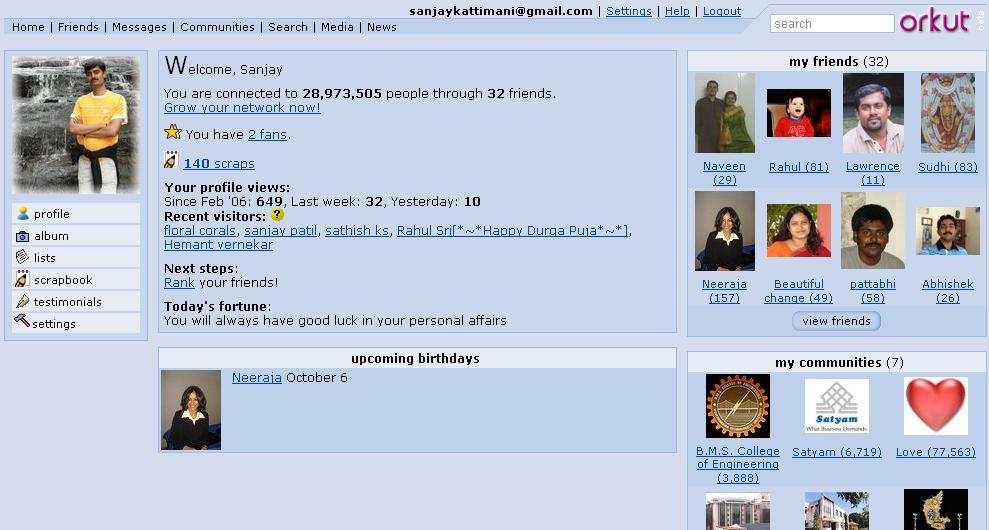
    You can build network of your friends and view their network too. All your visits to other’s orkut page are tracked and they know who came to their site.


    Some cool features of Orkut
  • Orkut testimonials option lets your friends write about you. This feedback is shown to all your visitors.
  • Orkut scrapbook is like your note pad where others can write messages for you. Scrap book is the most common option that everyone uses to talk to each others.
  • Orkut private messages can be sent your friends individually or to the whole group.
  • Orkut birthday alarms informs you about birthdays of your friends in your network (so you wont miss any one whos on your network).
  • Orkut rating lets you rate your friends how trusty, cool and sexy they are ;) In addition you can declare yourself as a fan of your friend(s).
  • you can export list of your friends to excel (CSV) format.
  • Recent visitors to your orkut home page. It gives you clickable profile link.
  • Orkut album lets you add your photos to share with your friends on your network.

    Orkut works on invitations, so some one needs to invite you to create an account in orkut. Ask me for a free orkut invitation.

    How to Log in to orkut in invisible mode
    I am finding lot of people coming to this post searching for logging in to orkut in invisible mode, so thought i will add a few words on this topic too.

    1. If you'd like to check out orkut members anonymously, you can prevent other users from knowing you looked at their profile by visiting http://www.orkut.com/Settings.aspx and checking "Disable Profile Visitors."

    Note that this will also prevent you from seeing who has viewed your profile. To add this feature back to your profile, you will need to allow orkut members to see that you have viewed their profile by un-checking "Disable Profile Visitors" in your settings.

    2. You can create a another temporary id which should be used only for browsing invisibly. Do not add any of your friends or yourself to this new id. do not accept any friends and you will remain anonymous. Others who see this new id on their recent visitors list, can send you message. But its up to you to decide whether to reply/ignore or delete.

    There are lots of groups like orkut India, orkut Satyam etc, virtually every possible group. You can create your own and participate in the discussions and events.
    Visit my orkut page at http://www.orkut.com/Home.aspx?xid=10672691803081804255

    Have a great bonding with your friends :)
  • Thursday, April 13, 2006

    Google personalize homepage

    Although this is pretty old (was added at least 4 months back) option, i dont see any one using it.
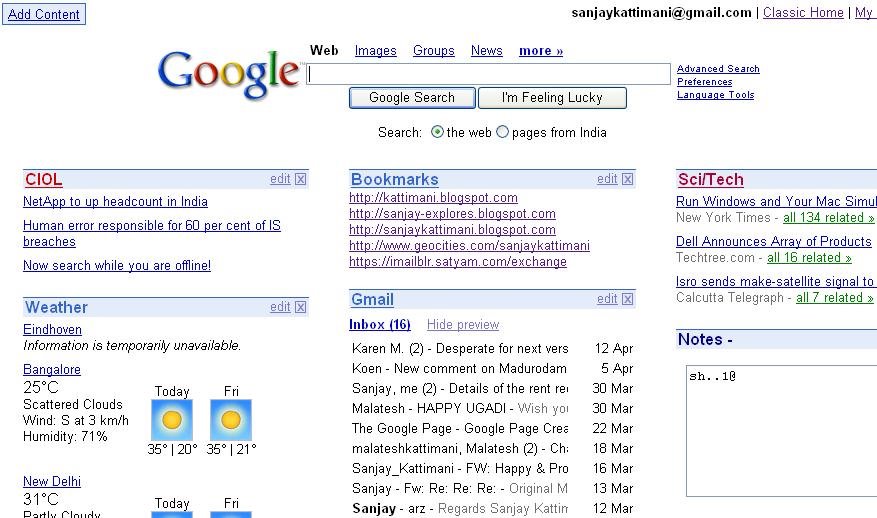
    Welcome to google personalize the the place where you can choose what you want to see on your google search home page.


    How to use it.
    You need a gmail account for this (Ask me to invite you if you need one).
  • Sign in with your gmail id, then click on personalized homepage,
  • Choose contents for your home page. There are a number of categories to choose contents for your page. Some of them are News, Business, Technology, Sports, Lifestyle, Fun and others. You can also add your favorite URLs, Last 10 gmail messages, weather forecast of chosen cities around the world or A Quick notepad.

    When you personalize your homepage it looks like a simple all in one page with your own content & google search. This is quite handy as it lets me have a glance all contents that i would like to see for the day in one page.
    I have also stopped typing those large URLs and they are my home page contents and are just a click away.

    You can also change the location of the contents by just dragging them to the desired locations. You can also edit or delete them.

    I use personalize homepage as my browser start page. Yahoo also offers similar option called My Yahoo But it also displays advertise and lot of other links which you may not want to see.
  • Friday, November 25, 2005

    Whidbey refactoring feature.

    One of the many cutest features that appealed to me in Whidbey was code refactoring. So here are some of my comments on few of those code refactor options that I tried this week.

    Rename: You select a variable or method and choose rename from refactor, it renames all instances of that variable. Its different from find text in solution option. It smartly searches, and shows only matching variables or methods rather than just showing every possible instance of text match.
    Change signature : lets you add, modify or delete parameters from method signatures.
    Extract method: This is another neat feature that developers often need. Extract method creates a new method out of code that you selected. It creates required parameters and all automatic formatting and calls it from the code.
    Encapsulate Field: This is another feature that saves us from coding properties. Just choose the private variable and select Encapsulate field and eureka your property is ready.
    Extract Interface: lets you create an interface and its implementation from your class.
    A must see- 3 minute online demo of refactor feature on microsoft site.
    Refactoring is just one of the many new additions to the visual studio 2005. Will add some more soon.

    *************************************************
    After blogging on refactoring i went on reading more about it and found that it is stripped off from Visual Basic 2005 release. Microsoft came up saying that it was not possible to finish work on refactoring along with the numerous other goals and projects for the 2005 release, and suggested to use Refactor! for visual basic 2005

    Wednesday, October 19, 2005

    Visual Studio 2005 first look at MSDN Day

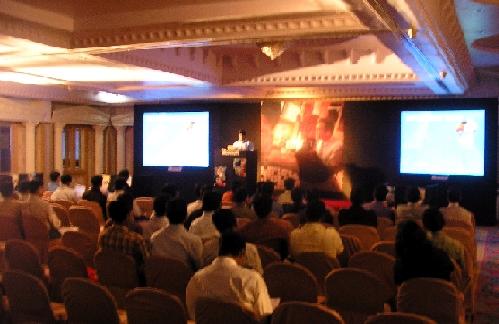
    Awesome developments to IDE and ASP toolbox in Visual Studio 2005. VS 2005 is becoming a kind of swiss army knife - All in one tool for .net development. Intellisense for almost everything you do with VS 2005. Had a first look at it today at MSDN day conducted at The Continental by Satyam.

    Visual studio 2005 is releasing in November. ASP.net with this version has lot of [50+] new controls to help you with almost everything you wanted.

    Some great improvements to vs 2005


    • Controls can be dragged in source mode (Note earlier only design mode allowed you to drag and toolbox was disabled in design mode)
    • Intellisense for every XML having valid DTD.
    • Clean application folder - creates files only when required (eg. web.config)
    • Error helper pops up with various options (details of the error, exception class details etc) - In earlier versions you had to go to msdn or google to help yourself with the exceptions raised.

    • Standard validations to make the code compatible with selected compatibility option. Intellisense makes sure options are valid.
    • Allows mixed development of vb.net and c# in different pages, they can be compiled together to make one dll.

    Links related to visual studio 2005

    Summary In short lot of intelligence is built around the IDE keeping developer in mind. Thats what is needed to make a developer's life easier and which inturn helps in reducing the development time.What next after visual studio 2005 ? -Here is the Roadmap by microsoft


    Monday, September 26, 2005

    Yahoo 360 degree vs Hi5

    Here is yahoo killing Hi5

    Whats Yahoo 360/Hi5

    Hi5 or Yahoo 360 is your site/place to create network of your friends. You can showcase your photos, interests, blog, personal information etc etc. This is exactly what Hi5 has been doing since many months. This has been one of the place for exploring (yes you can explore new friends before adding them as your friends) and also meeting lot of dates (Ah.. thats what people on Hi5 have been saying... not me ).
    In addition to most of Hi5's features yahoo has Blast message. You can call this an extension of your yahoo profile where it showed you a summary of your account.
    Yahoo 360 will show you many more details in a neat format. Checkout my Yahoo 360
    What Yahoo 360 product dev team has to say.. http://blog.360.yahoo.com/product_360
    Future : This is one of the effective ways of bringing people/friends together and make them stick to the website as often as possible. Google should be coming with its own 360 degree product soon.


    Tuesday, September 13, 2005

    Windows Anti-Spyware

    Do you get popus of software/websites for which you never subscribed or installed any application? That must be a spyware.
    Windows anti-spyware is a security technology that helps protect Windows users from spyware and other potentially unwanted software.
    This helps you to reduce negative effects caused by spyware including slow PC performance, annoying pop-up ads, unwanted changes to Internet settings, and unauthorized use of your private information. Continuous protection improves Internet browsing safety by guarding over fifty (50) ways spyware can enter your PC.

    Supported by xp and windows 2000 series of operating systems
    Download from http://www.microsoft.com/downloads/details.aspx?FamilyID=321cd7a2-6a57-4c57-a8bd-dbf62eda9671&displaylang=en#requirements

    Good thing about this software, detects and lets you removes existing spywares and It will ask you before it lets any application installs itself permanently on your pc (like a shortcut on your desktop, a startup item etc).
    Such complementary applications will make your operating system more reliable.

    Friday, October 08, 2004

    Discussion boards

    What is a discussion board?

    Discussion boards are common place for your website visitors to discuss about the predefined topics. They are also known as bulleting boards. Every one can discuss their opinions/views on available topics/issues (commonly known as threads)
    Most of you might have already used some kind of discussion groups like experts-exchange.com , google disussions etc
    Eg.
    1. Webmasterworld.com has a discussion board that covers all topics related to webmasters starting from webhosting to website submission and internet marketing.
    2. BMSCEIAA discusses all alumni association related topics like scholarship sponsoring, meetings, future plans etc.
    Administrator will have control over all posts/replies and hence can control almost all activities of the board from user registration to threads moderation.


    Whats the use of it?
    · Involve your website visitors in discussing about your favorite topics related to your website.
    · Very good media to attract repeat customers.
    · Value added service for your customers to express their views of issues/services/products related to your website.
    · You can collect survey information from your discussion group members through polls.
    · More hits to your website through discussion group as search engines index these topics.


    How to install one?
    You need to have some basic understanding of website control panels. Further instructions of installation available on the respective websites of the discussion boards.

    What are the popular ones?
    I am reviewing 2 major BBs
    Phpbb – This is a open source discussion board developed using PHP and works with various databases including mysql, ms access, sql server, oracle etc. It works best with mysql database. This is one of the most widely used discussion board. Good for small to medium discussion boards. Since the code is open source it can be used for free, and you can change the layout according to your website template. I have installed phpbb discussion group on manvish and BMSCEIAA site.
    Provided by http://www.phpbb.com
    Various accessories for phpbb (like more admin options and hundreds of other useful goodies for phpbb) available at http://www.phpbbhacks.com

    Vbulletin- This is another popular discussion board provided by http://www.vbulletin.com This is mostly used on high traffic sites. Its also famous for its powerful control panel for admin. This software costs around $165 and a demo version of the software is available on their site.

    Comparision of phpbb vs vbulletin

    Conclusion
    Discussion group is an indispensable tool for any webadmin who wants to see more traffic and activities on his site.

    Was this Useful...? Comment on the post.

    Tuesday, August 24, 2004

    Toogle - Text version of Googles Image Search

    Toogle is a Text version of Googles Image Search. Currently it creates images out of the very term that was used to fetch those images. Find out for yourself at

    Toogle - http://c6.org/toogle/

    try searching for sanjay ;)