Sunday, September 21, 2008

Presentation Skills for corportate presentations - Download ppt

Presentation skill is one of the major must know trait for any higher role in the organization ladder. It also boosts your confidence in multiple areas.


My Presentation skills
The time that I have during business wait is very well used in sharpening some of my less confident skills. Presentation is one the major skill that I acquired during this period. Public speaking is an art which can be mastered only over a period of time. Before this my presentations (rather there was no formal presentation till this year) were fairly limited to my project team and contents were limited to the team/project only. Now this new unit exposed me to much larger audience (minimum of 80 employees) and i was the first one to cash the opportunity. I started organizing some regular presentations and there by i got an opportunity to address everyone for a small duration. It slowly built the confidence even to talk on some surprisingly new topic to fill the time gaps.

Presentation download
There are 101 things to talk about presentation. Find many of them neatly organized in the PowerPoint slide show. You can Download and use the following presentation if you would like to give a presentation on "Presentation skills".

Off track story
Presentation skills come naturally to teachers or should i say some teachers are very bad at presentation?? It reminds me of all my teachers of early childhood and their impression on me. Although I never thought I would ever write on one of them after nearly 20 years there was one very bad point that I would like to high light. One of my teachers constantly used to uplift his trouser at least once every minute (Fun apart; he was excellent in science experiments and use to make firecrackers himself with raw materials). Any presenter who is in the eyes of public should mind these small gestures; else they become a reason for imitation and laughter.

Conclusion:
Corporate presentation skills are a must for every manager or any one who faces clients. Your investment of time to acquire this skill will not go waste. It will take you a long way for the rest of your life.

Friday, August 01, 2008

Recession time - When the going gets tough, toughest gets going

With many people on business wait for more than 6 months in most of India IT service companies, they are bound feel the sharks circling around them sooner or later. Lets access the situation.

Economies are down globally, which means limited funds are available for IT expenditure. As a result Some projects get canceled and others get delayed. This situation affects every stake holder of the projects.

When employees are working for projects they are hammered all the time with work. When they come to business wait most of them spend time time aimlessly. Companies spend great amount of money to keep the team united and up-to-date. In the times of tight situations the incompetent employees get elbowed out by their unhappy managers. fair enough for the companies., To be in business they need nurture the best of the talents and get rid of the weeds.


Here is a list of things that you can do to utilize this precious time.

  • Get Trainings - Check your company's training calendar and attend every possible training thats useful for your career.
  • Get certifications - what better time to study & take those pending exams than this free time? You are going to get paid while you learn.
  • Volunteer for Internal projects - Most people disregard internal projects(they can be dummy projects too), but they are the best ways to
    1. Keep in touch with technology
    2. Switch to a new technology
    3. Trying out new roles and responsibilities.

  • Work as shadow resources - You may not generate revenue for the organization, but you can surely become one dependable resource for the project in the times of need.
  • Volunteer for organizational initiatives - Some initiatives like recruitment drives or Road shows need volunteers, if you are experienced in that, jump in and make a difference.

    This list is also useful to defend how you utilized your time during business wait. If you have used this time to your advantage, the business wait can be a boon to boost your career with new roles and responsibilities.
  • Wednesday, June 18, 2008

    Firefox 3 - Be a part of Guiness world record

    FireFox 3 is here. Mozilla wants to create a guinness world record. More than 7 million are already downloaded. I haven't explored the plug-ins or other features yet.

    Although i have affection for Internet explorer and most of Microsoft products ;) I do like to explore and compare other products. I found was that FireFox has definitely become better compared to its previous versions (yes i have tried version 2 also)
    http://www.spreadfirefox.com/en-US/worldrecord
    Go ahead, download and be a part of the guiness world record.
    checkout how this blog looks on mozilla firefox 3.


    Although this blog had perfectly fine layout,
    Kannada greetings website was slightly different from how it is in IE (FireFox isn't looking good).That's fine, we have a better performance compared to Internet explorer in FireFox which is the best reason to download. Rest of the new features you can read on its features site. I might post again when i explore some new plug-ins.

    Tuesday, March 18, 2008

    PMP - A certification for Project Managers.


    Its been a long time I sat down and studied something seriously. Its time to get certified again. PMI (Project Management Institute) is the de facto standard in Project Management methodologies.
    PMP is a certification offered by PMI after a rigorous test of PM methodologies. So I am heading towards PMP certification. My time starts from 13th March 2008, Saturday. Target it to complete in 2 months that’s 13th May 2008.
    In addition to MCSD and Six Sigma+ I am sure this certification will become another feather in my cap.

    Henceforth a few blog posts will be dedicated to many topics related to project management methodologies. I am sure this will also serve as a quick reference.

    I am refering PMBOK Guide by PMI, Project management Jump Start, and Head first PMP.
    I will write a review of these books when i am done with them.

    If you are interested in sharing your experiences of PMP feel free to post comments at the end of this post. I would love to share my experiences.

    Glossary related to PMP


    BAC= Budget at completion.
    CPI= Cost Performance Index.
    CV= Cost varience=EV-AC.
    ETC= Estimate to completion.
    EAC= Estimate At completion.
    EV= Earned value - Budgeted amount of work actually completed on WBS.
    PV= Planned value - Budgeted cost per WBS scheduled to be completed.
    SPI= Schedule Performance Index

    SV= Schedule varience=EV-PV.

    Tuesday, June 26, 2007

    Sony Cybershot DSC-N2 Review - Migration from 3 to 10 MP

    Sony Cybershot DSC-N2, Review of a versatile, lightweight, compact and easy to use camera that comes in attractive champagne color. I have tried 2 other Sony models in the past, this model clearly out performs all cameras i tried before.

    Some of the things i had in mind while considering this model - Sony DSC-N2


    1. Awesome 10 Mega pixels - there are very few brands that have compact cameras with 10MP. There are 12MP models in the market too, Most of them are too expensive and for professionals.
    2. Sony Brand - As almost (well i think so) every one agrees that Sony is a reliable and one of the best in electronics brand.
    3. Huge 3" touch screen LCD adds to the fun - some one said on the net that "LCD works like citi bank ATM".
    4. Whole bunch of features - I am a geek and like all fundo features being packed in such small devices read more at http://www.sonyindia.co.in/index_n2.html
    5. Battery life - 300 to 400 photos can be clicked.
    6. Market review of camera.
    To read more about the camera go the product site

    My old camera is in fully working condition as it was 3 years back.
    I had a Olympus C-310 model a 3.2 Mega pixel camera bought in Sept 2004.


    Some of the considerations that made me change the camera are
  • Batter life was very limited 10-50 photos only (of course it depends a lot on the batteries used)
  • There was a 2-8 seconds delay after clicking a photo. This is one annoying thing.
  • Audio wasnt there, and videos almost doesnt make any sense without audio.
  • No connectivity to TV.
  • Video captured wasnt almost like VGA mode, and wasnt of good enough quality to share.
  • It has 3 Mega pixels and now you dont find cameras with less than 5 Mega pixels.(Ah.. technology changes so fast..)
  • Evening or night mode photos were not acceptable.
  • Small LCD.
  • No slide show opion.. had to browse through the photos manually.

    When I bought this camera it was one of the best looking, highest mega pixel camera in the market and was in the budget that was about $400 including a 128MB XD memory card). But over a period of three years i had started missing above listed features.
    Its was high time i changed my 3Mega pixel camera with a new one.


    Bargain tips
    * Ideally wait for some bargain time like new year, christmas, thanks giving etc to buy anything at great prices.
    * If you are in hurry, still check some sites like deals2buy.com, froogle.com and other favorite sites of yours and compare prices.
    * Checkout taxes and shipping cost.
    * Ask your friends who make lot of research on prices (they will be more than happy to share their experiences).

    I bought 4GB memory stick and additional battery throught amazon.com


    All photos (well almost) that you saw on my blogs so far were clicked by this camera. Probly Niagara trip was its last journey with me.

    -- My wishlist of features ---
  • Shockproof (most cameras are)
  • Waterproof
  • Projector
  • High definition video recording
  • DSLR quality pics
  • About 20X optical zoom

    And all these features...i still want my compact camera :) Technology...Show me the way...
  • Tuesday, May 01, 2007

    Technical Glossary

    This is an extension of my previous article Shortfoms of communication. This time you will see a technical terms & abbrevations also referred as glossary. This is an effort to consolidate some of the technical shortforms that we come accross. Almost all these terms are related to project management and other terms related to software industry.


    AD - Activity Description
    ADM - Arrow Diagramming method
    ADSL - Advanced Digital Subscriber Line

    BAC - Budget On Completion
    BIOS - Basic Input/Output System
    Blog - web log. Just like this one
    BMP - BitMaP - A windows file format to store images.
    BRM -Build and Release Management

    CDM - Conceptual Data Model
    COQ - Cost Of Quality
    CPM - Critical Path Method
    CPI - Cost Performance Index
    CR - Change Request
    CSS - Cascaded Style sheets
    CSV - Comma Seperated Values

    DB - DataBase
    DBMS - DataBase Management System
    DFD - Data Flow Diagram
    DHCP - Dynamic Host Configuration Protocol
    DNS - Domain Name System.
    DSL - Digital Subscriber Line.
    DVD - Digital Versatile Disc or Digital Video Disc

    EDD - External Design Document
    ER(Diagram) - Entiry Relationship Diagram
    ERP - Enterprice Resource Planning
    FTP - File Transfer Protocol

    GIF - Graphics Interchange Format - One of the earliest image formats
    GPL - GNU General Public License

    HTML - HyperText Markup Language
    HTTP - HyperText Transfer Protocol

    IT - Information Technology
    JAD - Joint Application Design

    LDD - Local Delivery Desk
    LTV - Loan To Value

    MCAD - Microsoft Certified Application Developer
    MCP - Microsoft Certified Professional
    MCSD - Microsoft Certified Solutions Developer - a Certificaiton by Microsoft

    OOPS - Object Oriented Programming System

    PERT - Program Evaluation & Review Technique
    PMI - Project Management Institue
    PHP - PHP Preprocessed Hypertext programming ??

    PL - Project Lead
    PMI - Project Management Institue
    PMP - Project Management Professional
    PR - Permanet Resident (US)
    PR - Page Rank (Google)
    PR - Public Relations (Marketing)

    RAD - Rapid Application Development
    RDBMS - Relational Database Management System

    SAM- Security accounts Manager
    SSAD - Structured System Analysis and Design
    SOW - Statement Of Work

    TBD - To be done
    TDD - Technical Design Document
    TL - Team Lead
    TPM - Thought process Map

    UML - Unified Modeling Language

    WBS - Work Breakdown Structure.

    Do share the other terms that you came accross by commenting on the topic. I will also add them as a part of the topic.

    Monday, February 26, 2007

    .net session timeout settings in IIS6 on windows 2003 server

    Does this sound simple web.config setup?
    Nope this is way beyond that newbie configuration.

    Problem: We were facing timeout issue on one of our servers. Web.config settings had no effect on the time out.

    Note: In all screen shots pink color is hiding the actual server details.

    Solution:
    So here are some more interesting findings related to timeouts of sessions in IIS6 hosted on a windows 2003 server. You may need to change one or more of these setups in your server according to your setup.
    There are totally 5 setups that influence your timeout. All of those are discussed here.
    1. Web.config file of Application: First one to influence timeout is Session timeout setting in your we.config file.


    Note: Web.config file is inherited to the subfolders and subfolders config settings take the precedence in case they exist.

    2. Application session timeout in IIS:
    Go to IIS, right click on the web application, go to properties. Go to Directory tab, click on Configuration button. Application configuration tab opens, click on Options tab as in the screenshot, you will find enable session state. Change the session time out period here.


    3. Default website session timeout in IIS: Right click default web site under IIS and choose Home directory tab. Click on configuration button to open application configuration. Choose options tab and you will find Enable session state again similar to session state of each application. Enter higher session timeout period which will be application to all sites in the webserver.


    4. Change Worker process idle timeout of application pool – Shutdown worker process after being idle for (time in minutes) – Default is 20 minutes. This setup is applied for all websites that use this application pool. To change this, Right click on the required application pool, choose Performance tab, and change the duration of idle time or uncheck the option so that the process is never recycled. You can also create an application pool, configure it, and use it for a selected list of web applications.


    5. Change Recycle timeout period of application pool: Right click on application pool or default application, and choose Recycling tab. Change the “Recycle worker process (in minutes)” option to either change the period or disable the option by un checking. Un checking this option may be a good idea from performance point of view.


    And finally there is a last one in machine.config file. But that does not affect any of these configurations and these setups take the precedence.

    Let me know if you have any timeout related issues. Lets share.

    Tuesday, January 09, 2007

    .net - Error while trying to run project: Unable to start debugging on the web server. The project is not configured to be debugged

    Running or debugging a ASP.net web application from visual studio.net throws following error.

    "Error while trying to run project: Unable to start debugging on the web server. The project is not configured to be debugged."

    Reason: .net web application is converted in to a directory by IIS when its renamed or copied from other location
    Resolution : Change the directory back to application with these steps

    1. Go to IIS management tool Choose select your virtual dir.
    2. Go to Properties of the virtual directory by choosing Properties from right click menu.
    3. In the Properties dialog box, click on the Create button.


    Thanks Tim for that tip.

    Monday, January 08, 2007

    Happy New Year 2007

    I Wish all my visitors and their families a very happy and prosperous new year.
    codebase="http://download.macromedia.com/pub/shockwave/cabs/flash/swflash.cab#version=6,0,0,0"
    WIDTH="648" HEIGHT="429" id="new year" ALIGN="">
    TYPE="application/x-shockwave-flash" PLUGINSPAGE="http://www.macromedia.com/go/getflashplayer">


    View Full screen

    My new year resolution related to blogging - I am going to blog on technical topics at least once every fortnight.

    How about yours?

    Monday, October 30, 2006

    Build Your own toolbar By Conduit

    A classic example by Conduit about customizing and packaging existing things in to a resourceful product.
    This product helps you build your own toolbar with your links and images that you can share with your friends and customers. Take a look at a sample toolbar created.


    I still remember those days when i tried myself creating such a toolbar and there was hardly any documentation about how to do it. Now even a newbie can create a toolbar and for free.

    These small utilities add value to your website(s). Here is a list of few features offered by this toolbar.

  • Offer one click access to your websites/blogs and other resources to your loyal customers.
  • Shows your site to your customers as long as they're online. Host of other services like Chat, Weather, Radio can be plugged in to this toolbar.
  • Chat with other users who have the same toolbar installed.
  • Add Contact Us link and the feedback about the toolbar is sent to you as an email.
  • Add search capability to your toolbar just like google toolbar and choose the search engine too.
  • You can set up your mail boxes and Get notified when you receive new e-mails to your POP3, Yahoo!, Gmail, or Hotmail accounts

    I created a toolbar for my blogs and website. Take a look at it and feel free to use it. Its free from adware, spyware and promotional stuff.
    http://sanjaykattimanisblogs.myblogtoolbar.com
  • Monday, October 09, 2006

    Tintucso virus, removal


    Tintukso virus - Very little is known about this virus as of now. It comes to you through Yahoo messenger as a link when one of your friend’s pc gets infected. Once you click the link, it installs itself at attaches itself with the OS to keep you bugging :d It sends the link to all your active contacts once it infects. This was found (on a friend's pc) just today, 09th October 2006.

    Symptoms
  • You cannot change your homepage (options for changing homepage are disabled).
  • You cannot launch regedit; PC re-boots as soon as you try to edit registry.

    Cause
    Virus/trojan not yet explained in detail on the net yet. it sends a message saying test the site and shows up the folowing url
    http://tintucso.com/luke/
    Please do not launch the above url unless you have a good firewall and antivirus (and enough courage to open it).

    My official PC categorized it as a dating/unwanted site and blocked it. Didnt take a chance on my Home pc.

    Remedy
  • Scan with your antivirus or adware , if it can detect it; chances are that it will also clear it.
  • If above fails, on a windows box, restore your PC to the last known good configuration. here are the detailed steps to restore your operating system on a XP system.
    http://www.microsoft.com/windowsxp/using/helpandsupport
    /learnmore/systemrestore.mspx


    Update from Symantec as on 12th October 2006
    Symantec Japan has confirmed the virus and documented the details of the virus here
    http://translate.google.com/translate?
    hl=en&sl=ja&u=http://www.symantec.com/region/jp/avcenter/
    venc/data/jp-w32.imaut.b.html&sa=X&oi=translate&resnum=4
    &ct=result&prev=/search%3Fq%3Dtintucso%26hl%3Den%26lr
    %3D%26rls%3DGGLG,GGLG:2006-26,GGLG:en


    Thanks Arvind for your valuable feedback on this virus.

    I shall keep updating this post with the new findings on the virus.

    Have a safe computing :)
  • Saturday, September 30, 2006

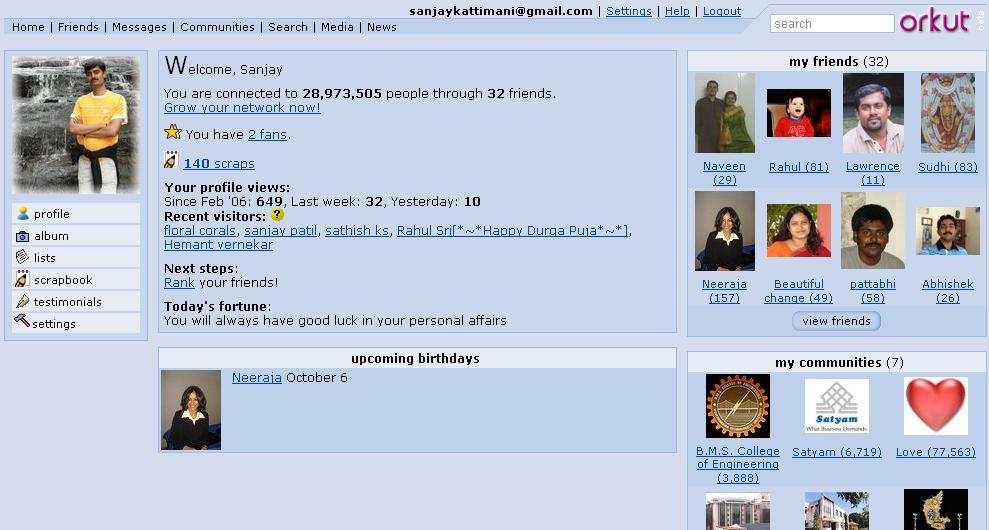
    Orkut – Googles answer to Yahoo 360 degree and Hi5


    Orkut Google comes up with its awesome rival product to yahoo 360 degree, Hi5 and lots of other such network building portals. If you do not know about yahoo 360 degree and hi5 read my previous article on yahoo 360 degree and hi5.
    As usual google has come up with a crisp strait forward and intuitive interface compared to any of its competitors.
    You can build network of your friends and view their network too. All your visits to other’s orkut page are tracked and they know who came to their site.


    Some cool features of Orkut
  • Orkut testimonials option lets your friends write about you. This feedback is shown to all your visitors.
  • Orkut scrapbook is like your note pad where others can write messages for you. Scrap book is the most common option that everyone uses to talk to each others.
  • Orkut private messages can be sent your friends individually or to the whole group.
  • Orkut birthday alarms informs you about birthdays of your friends in your network (so you wont miss any one whos on your network).
  • Orkut rating lets you rate your friends how trusty, cool and sexy they are ;) In addition you can declare yourself as a fan of your friend(s).
  • you can export list of your friends to excel (CSV) format.
  • Recent visitors to your orkut home page. It gives you clickable profile link.
  • Orkut album lets you add your photos to share with your friends on your network.

    Orkut works on invitations, so some one needs to invite you to create an account in orkut. Ask me for a free orkut invitation.

    How to Log in to orkut in invisible mode
    I am finding lot of people coming to this post searching for logging in to orkut in invisible mode, so thought i will add a few words on this topic too.

    1. If you'd like to check out orkut members anonymously, you can prevent other users from knowing you looked at their profile by visiting http://www.orkut.com/Settings.aspx and checking "Disable Profile Visitors."

    Note that this will also prevent you from seeing who has viewed your profile. To add this feature back to your profile, you will need to allow orkut members to see that you have viewed their profile by un-checking "Disable Profile Visitors" in your settings.

    2. You can create a another temporary id which should be used only for browsing invisibly. Do not add any of your friends or yourself to this new id. do not accept any friends and you will remain anonymous. Others who see this new id on their recent visitors list, can send you message. But its up to you to decide whether to reply/ignore or delete.

    There are lots of groups like orkut India, orkut Satyam etc, virtually every possible group. You can create your own and participate in the discussions and events.
    Visit my orkut page at http://www.orkut.com/Home.aspx?xid=10672691803081804255

    Have a great bonding with your friends :)
  • Sunday, June 11, 2006

    How to create, write and promote blog?

    How to blog?
    In my last post I wrote about why one should blog (its advantages) Lets see how you should begin writing your blog.

    Before you begin
    • Prepare a theme for your blog and have a few topics around that theme. It could be anything from your hobbies to day-to-day happenings in your city.
    • Research and read about what others have written on the same topic before you begin.
    • Take a look at few blogs to get an idea of different templates available.

    How to create your blog
    • Choose a good site where you want to blog. List of them with some reviews are listed at http://weblogs.about.com/od/weblogsoftwareandhosts/a/topfreeblogs.htm my personal recommendation is blogger offered by google and is free (You can be sure that it will not popup or add ugly advertisements).
    • Register yourself to create an account and a blog.
    • Choose the template that matches your tastes from list of available templates. Most of them also let you customize with your own html code (you can tweak it if you know else don’t bother default templates are good enough)
    • Create your first post on the blog. Use html codes whenever necessary.


    What to write.
    • Have a theme of your blog and let the topics be around that theme, so that people come to your site repeatedly if they are interested in similar topics.
    • Try to keep it brief and effective but there are really no rules.
    • Although you are free to say whatever you want, remember that you are accountable for what you say.


    How to write effective blog
    • Add pictures as applicable. They speak out lot more than what words can describe.
    • Enable comments in your blog to get feedback from users.
    • Enable user verification - This helps lot of automated Spam comments getting added to your blog.
    • Blogs are meant to be fun, so write with passion and everything else will fall into place.
    • Use bold, italic and other text formatting to highlight the importance of certain contents.
    • Blog regularly – ideally few times a month. More the content, more visitors, at the same time do not disappoint your visitors with contents available on other site/blogs.


    Now created/have a blog. What Next?
    • Add counters to keep track of visitors of your blog.
    • Promote. Add link to your blog in your email signatures.
    • You can add advertisements to your blog to earn residual money.


    What are you thinking? Jump start and make you presence felt. Happy blogging.

    Wednesday, June 07, 2006

    Blogging & its Advantages

    What is a Blog?
    weblog (usually shortened to blog, and occasionally spelled web log) is a web-based publication consisting primarily of periodic articles, most often in reverse chronological order.” – wikipedia

    Blogging is the act of writing in one's blog.
    A person who keeps and/ or writes a blog is called Blogger.

    Blog


    Advantages of blogging

  • Voice
    This is the simplest, easiest, quickest and most affordable way to share your voice/opinion/ideas with your audience.
  • Information Sharing
    Sharing your learning is the essence of blogging. Most people (i do) research on the topic before blogging, which extends their learning on the topic.
  • Reach
    Blogging lets you reach people worldwide from person sitting next to you to person sitting on the other part of the world.
  • Expressing
    You can express your views on everyday topics like politics, music, technology, hobbies or movie reviews. The list of topics is endless.
  • Knowledge management
    Blogs can be used to as an extremely effective knowledge management tool. You can keep your posts well documented for years to come.
  • Instant feedback
    People give you instant feedback on your posts (also called articles of the blog) which helps you refine your understanding on the topic.

    In my next post i will discuss on how to create, write and maintain a blog.
  • Tuesday, May 23, 2006

    PMP - Project Management Professional course.

    Ravi’s insightful views helped all of us to get broader perspective about project management and the path ahead.
    Another advantage of being in larger companies like Satyam.
    Company helps you to get certified.

    Whats the significance of PMP?
    It means to current and potential employers that you have demonstrated a solid foundation of knowledge from which you can competently practice project management.


    Our group that finished project management workshop.

    Some Facts related to PMP
  • Named as one of the top 4 certifications for 2006
  • Has more than 120,000 certified members in more than 135 countries, 75,000 + PMPs till September 2004
  • PMBOK is the globally recognized bible to prepare for PMP exam.

    Faqs related to PMP http://www.pmi.org/prod/groups/public/documents/info/PDC_Cert_FAQ.asp
  • Tuesday, April 25, 2006

    Yahoo - Stealth settings

    Stealth setting is an option in Yahoo messenger that lets you choose whether you want to appear online or offline to a person or a group of people. Its essentially appearing invisible to selected people.

    Why this option needs a mention in this blog:
    This is one of the most useful and also one of the most under-utilized option of yahoo messenger (one of the top 3 most popular instant messenger in the world, and my favorite)

    Why should we use it:
    Most people log in to invisible mode when they dont want to be disturbed by a few of their friends.
    IMO ...
  • when you are invisible (and when your friends know that you are logged in) all your frineds think that you are hiding from them, but you may be trying to avoid only one or two of them. This is a typical case where you should use stealth setting.
  • When you are in office, typically you want to appear offline so that your friends do not buzz u often. And also you will inform all your good friends that they can still ping you. This is again another situation where you should be using stealth setting instead.

    How to use it:
    Create a group and move all your less important and disturbing friend to this group. Set the stealth setting so that you appear offline to all these people. You can still see them being online. You can intitiate a chat with them when you want to. Life should be much easier with them.


    Some tips:
  • Use stealth setting to keep those disturbing friends aside (i could be one of them )
  • Keep in touch with rest of your friends effectively by appearing online.
  • Use busy or other status when you want to convey your status.
  • Use voice or video chat when ever required/possible.
  • When some one is on SMS, do not expect a reply immediately as they may not be able to reply from they cellphone as fast/frequently as messenger.
  • Thursday, April 13, 2006

    Google personalize homepage

    Although this is pretty old (was added at least 4 months back) option, i dont see any one using it.
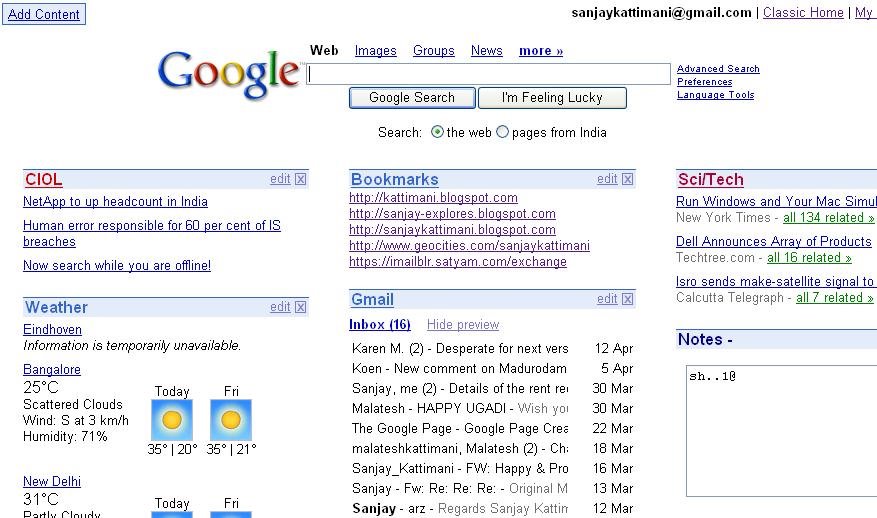
    Welcome to google personalize the the place where you can choose what you want to see on your google search home page.


    How to use it.
    You need a gmail account for this (Ask me to invite you if you need one).
  • Sign in with your gmail id, then click on personalized homepage,
  • Choose contents for your home page. There are a number of categories to choose contents for your page. Some of them are News, Business, Technology, Sports, Lifestyle, Fun and others. You can also add your favorite URLs, Last 10 gmail messages, weather forecast of chosen cities around the world or A Quick notepad.

    When you personalize your homepage it looks like a simple all in one page with your own content & google search. This is quite handy as it lets me have a glance all contents that i would like to see for the day in one page.
    I have also stopped typing those large URLs and they are my home page contents and are just a click away.

    You can also change the location of the contents by just dragging them to the desired locations. You can also edit or delete them.

    I use personalize homepage as my browser start page. Yahoo also offers similar option called My Yahoo But it also displays advertise and lot of other links which you may not want to see.
  • Tuesday, February 14, 2006

    Sql Injection - Protect your applications

    Sql Injection. Whats it it?
    Its injecting sql server with scripts that can potentially break the security barriers of the application/server.
    SQL injection is a security vulnerability that occurs in the database layer of an application, Its is not a SQL Server problem, but a problem with improperly written applications.

    Audience:
    Any one who develops/test applications that use sql statements.
    Hey developers check it on all your applications that you have written so far (i checked it.. fortunately it didnt break any of my code)
    SQL injection - protect your applications.

    What can it do?
    One or more of the following based on your application implementation
  • Hackers easily get authenticated on your application.
  • Hackers (even a simple db aware guy can do this) can read most of your table data.
  • Change most of the data of your DB.
  • Delete records from your tables.
  • Restart your webserver.
  • Shutdown your database. Can you think of anything worse than this for your application?

    Very simple example of Sql injection.
    Most of the applications have login screen, try entering following as
    login name: test' or 1=1 --
    password: anything
    An example of sql string created by any simple application vulnarable to sql injection is

    select * from users where username='test' or 1=1 -- and password='anything'

    This is how its evaluated to true, and the first level of entry.. successful.
    Curious to know other ways of injecting sql server? Read the article

    How to avoid sql injection?
  • Limit access to admin account by creating seperate applcation account.
  • Restrict user input lengths.
  • Strip off all quotes(if they are not expected).
  • Filter out sensitive db keywords (potential threats) from your inputs (Like select, drop, _xp etc).

    With such few additional validations/coding you can make your application safe from sql injection attacks. Happy coding.
  • Thursday, December 15, 2005

    Cyber crimes on the high. Don’t be the prey.

    Cyber crimes are finding new targets everyday, be very careful if you are one of those users using credit cards or bank accounts online.

    Sample of how this works.
    You receive an email that looks like this...
    ----------------------------------------------------------

    Paypal fake logo
    PayPal is committed to maintaining a safe environment for its community of customers. To protect the security of your account, PayPal employs some of the most advanced security systems in the world and our anti-fraud teams regularly screen the PayPal system for unusual activity.

    We are contacting you to remind you that on 5 March 2005 our Account Review Team identified some unusual activity in your account. In accordance with PayPal's User Agreement and to ensure that your account has not been compromised, access to your account was limited. Your account access will remain limited until this issue has been resolved.

    To secure your account and quickly restore full access, we may require some additional information from you for the following reason:

    We have been notified that a card associated with your account has been reported as lost or stolen, or that there were additional problems with your card.

    This process is mandatory, and if not completed within the nearest time your account or credit card may be subject for temporary suspension.

    To securely confirm your PayPal information please click on the link bellow:


    https://www.paypal.com/cgi-bin/webscr?cmd=_login-run


    We encourage you to log in and perform the steps necessary to restore your account access as soon as possible. Allowing your account access to remain limited for an extended period of time may result in further limitations on the use of your account and possible account closure.

    For more information about how to protect your account please visit PayPal Security Center. We apologize for any incovenience this may cause, and we apriciate your assistance in helping us to maintain the integrity of the entire PayPal system.


    Thank you for using PayPal!
    The PayPal Team

    ----------------------------------------------------------

    Here is another version of the mail.. with another address..received few hours back. Do not enter any information in the site.. as it could still be active.
    ----------------------------------------------------------
    Paypal fake logo

    Dear PayPal Member!

    Attention! Your PayPal account has been violated!

    Someone with ip address 149.225.126.87 tried to access your personal account!

    Please click the link below and enter your account information to confirm that you are not currently away. You have 3 days to confirm account information or your account will be locked.

    Click here to activate your account


    You can also confirm your email address by logging into your PayPal account at
    http://paypal.com/. Click on the "Confirm email" link in the Activate Account box and then enter this confirmation number: 1036-8535-4511-9500-3892

    Thank you for using PayPal!
    The PayPal Team


    --------------------------------------------------------------------------------


    Please do not reply to this e-mail. Mail sent to this address cannot be answered. For assistance, log in to your PayPal account and choose the "Help" link in the footer of any page.


    You click on the link(Now you can safely click it as its already banned)
    It takes you to a site that exactly looks like paypal.
    That asks you to enter all your details including credit card details, paypal account details etc. It behaves exactly like paypal and at last shows up a page saying our servers are under maintenance, please try after some time.

    Whats exactly happening.
    The link that’s shown is different from the link to which user is taken on clicking it. Whole paypal site is simulated on the site very intelligently and your account details are stored in their databases which is used to lift money from your account.

    Life of these sites are very small. Most of such sites are banned as soon as they are found involved in cyber crimes.

    How to fight back.
  • Before clicking on any link from your email, think for a while. If it’s not worth a click don’t (They could be mails from email farms which are just validating existence of your email ids).
  • If you are tempted to click (Recently I received an email related to an offer from ICICI bank that which was pointing to such a site) Check the link to which its taking you to. Observe the URL in the above example (take the mouse pointer on the link, url of that link is shown in your status bar of the browser) http://203.215.94.193/.www.paypal.com/paypal/das676bsda6… don’t get carried away with paypal in the URL. It should exactly begin with www.paypal.com and not just a part of that else essentially it’s an illegal one.
  • If you find that a site is illegal, inform the concerned people and get the site banned so that others wont fall pray. Your few minutes of social

    I had another such mail, which had an interesting title. I clicked on the site, and it went to a yahoo site. As usual I entered my id and password. It showed me message asking me to try after some time. After verification I found that it was a fake site collecting my yahoo id and password. (That site got banned within 24 hours of my complaint to ban it) So be watchful about before giving out any of your passwords.

    Lets make use of internet as a safe and effective means.
    Here is a sites where you can lodge your complaints against cyber crimes http://www.ifccfbi.gov/index.asp
    A nice detailed Indian article related to cyber crimes http://cybercrime.planetindia.net
  • Friday, November 25, 2005

    Whidbey refactoring feature.

    One of the many cutest features that appealed to me in Whidbey was code refactoring. So here are some of my comments on few of those code refactor options that I tried this week.

    Rename: You select a variable or method and choose rename from refactor, it renames all instances of that variable. Its different from find text in solution option. It smartly searches, and shows only matching variables or methods rather than just showing every possible instance of text match.
    Change signature : lets you add, modify or delete parameters from method signatures.
    Extract method: This is another neat feature that developers often need. Extract method creates a new method out of code that you selected. It creates required parameters and all automatic formatting and calls it from the code.
    Encapsulate Field: This is another feature that saves us from coding properties. Just choose the private variable and select Encapsulate field and eureka your property is ready.
    Extract Interface: lets you create an interface and its implementation from your class.
    A must see- 3 minute online demo of refactor feature on microsoft site.
    Refactoring is just one of the many new additions to the visual studio 2005. Will add some more soon.

    *************************************************
    After blogging on refactoring i went on reading more about it and found that it is stripped off from Visual Basic 2005 release. Microsoft came up saying that it was not possible to finish work on refactoring along with the numerous other goals and projects for the 2005 release, and suggested to use Refactor! for visual basic 2005