Saturday, March 16, 2019

Snowflake Data Sharing - Complete video tutorial

Snowflake's data sharing feature lets you share your data with other account holders. Since data is shared as readonly, consumers do not incur any charges but they only pay for the compute resource they use.
snowflake-data-sharing

Checkout the detailed instructions video on my channel


LInk to this video - https://www.youtube.com/watch?v=GcrEK-VFEB8&list=PLUxVA4dlJgcz90Vbufh6o6p8Rrew-lnE3

Snowflake Secure Views

Snowflake's secure views let you abstract the logic and hide the underlying tables structures and their relations. These secure views help you manage data security and privacy.
snowflake-secure_views

In this video i reviewed all the details related to secure views and demo of using them.


Commands used in the video to demonstrate snowflake's secure views. Checkout the detailed video on my channel - https://www.youtube.com/watch?v=CRZQjxP10G0&list=PLUxVA4dlJgcz90Vbufh6o6p8Rrew-lnE3&index=3


--LIST PATIENTS
SELECT * FROM PATIENTS;


CREATE OR REPLACE SECURE VIEW ORG_PATIENTS AS
SELECT * FROM PATIENTS ;


SELECT * FROM ORG_PATIENTS ;

SHOW VIEWS;


SELECT FULLNAME,CITY,USER_ACCESS.ORG_ID,USER_ACCESS.ACCOUNT_ID FROM patients 
INNER JOIN USER_ACCESS ON PATIENTS.ORG_ID=USER_ACCESS.ORG_ID;

insert into USER_ACCESS values ('Baylor Hospital','');
insert into USER_ACCESS values ('Mayo Clinic','');


create table USER_ACCESS
(
    ORG_ID VARCHAR(50),
    ACCOUNT_ID varchar(50)
);

insert into USER_ACCESS values ('Baylor Hospital','MN30689');
insert into USER_ACCESS values ('Mayo Clinic','PO51568');

SELECT * FROM USER_ACCESS; 

TRUNCATE  TABLE USER_ACCESS SET ACCOUNT_ID='PO51568' WHERE 
ORG_ID='Mayo Clinic';

SELECT FULLNAME,CITY,USER_ACCESS.ORG_ID,USER_ACCESS.ACCOUNT_ID FROM patients 
INNER JOIN USER_ACCESS ON PATIENTS.ORG_ID=USER_ACCESS.ORG_ID;


select CURRENT_ACCOUNT();
select CURRENT_ROLE ();


--CREATE A SECURE VIEW
CREATE OR REPLACE SECURE VIEW ORG_PATIENTS AS
SELECT FULLNAME,CITY,USER_ACCESS.ORG_ID FROM patients 
INNER JOIN USER_ACCESS ON PATIENTS.ORG_ID=USER_ACCESS.ORG_ID
WHERE ACCOUNT_ID=CURRENT_ACCOUNT();


select * from ORG_PATIENTS;

SHOW VIEWS;
describe view ORG_PATIENTS;

describe view mycustomerview;
describe view ORG_PATIENTS;


select get_ddl('view', 'ORG_PATIENTS') view_defn;


Snowflake Time Travel - A complete guide


In the recent years IT Roles such as Database administrators are becoming  less and less relevant as most cloud based databases and datawarehouses are managed by IT engineers needing very little or no administration.

Snowflake already has very little administration. You do not need to do typical DBA tasks like index tables, partitioning or deal with space related issues. Time travel is another feature that lets developers self serve dba related task of reverting or restoring the database after you do issue some inadvertent commands.


In this detailed hands on video I explained about parameters that affect time travel and how to utilize this feature to revert the accidental or intentional database changes. 
Here are the list of commands used in the video

-- DATA_RETENTION_TIME_IN_DAYS

show parameters;
show parameters in database SALES;
show parameters in warehouse XMALLFORFINANCE;
show parameters in account;
show parameters like '%DATA%';
show parameters like 'DATA%' in account;
--CHANGES DATA RETENTION FOR THE DATABASEshow parameters in database SALES;alter DATABASE SALES set DATA_RETENTION_TIME_IN_DAYS = 1 ;

--CHANGES DATA RETENTION FOR THE WHOLE ACCOUNTshow parameters like 'DATA%' in account;alter ACCOUNT set DATA_RETENTION_TIME_IN_DAYS = 1 ;

select * from PATIENTS;
INSERT INTO PATIENTS values  (5,'TEST PATIENT','AMSTERDAM','Mayo Clinic');select * from PATIENTS at(offset => -60*5);
delete from PATIENTS where id=5;drop table sales.snow.PATIENTS ;
--Over a dayselect * from PATIENTS at(offset => -60*500000);

select * from PATIENTS at(timestamp => 'Sat, 16 Mar 2019 16:20:00 -0700'::timestamp);

select * from user_access;
--Before changes make by a specific queryselect * from patients before(statement => '025e545d-fc23-4e8d-9ac5-335943a1bec2');
create table restored_table clone user_access  at(timestamp => 'Mon, 09 May 2019 01:01:00 +0300'::timestamp);    create table restored_table clone user_access  at(offset => -60*10);    select * from restored_table;  drop table restored_table;    --Schema as existed 1 hour before  create schema restored_schema clone snow at(offset => -3600);  drop schema restored_schema;    create database restored_db clone sales  before(statement => '025e545d-fc23-4e8d-9ac5-335943a1bec2');  drop database restored_db;  show tables history  in sales.snow;show tables history  in sales;---Restoring objects
undrop table patients;
undrop schema snow;
undrop database sales;


More details are available in snowflake's documentation page - https://docs.snowflake.net/manuals/user-guide/data-time-travel.html

Check out my youtube channel for more videos - https://www.youtube.com/channel/UCT3bqK2QL93j-IFYFYbvjWQ

Thursday, April 12, 2018

Amazon S3 (Simple Storage Service) - object storage service

One of the Amazon's core service offering was highly scalable S3 storage. In this video i explained about its quick overview and hands on explanation most of its features including  Security, versioning, static website hosting, accelerated transfers, event handling, tags etc.
I covered this topic as I intend to do more videos in future that integrate with such services of cloud computing. Let me know your feedback.

Wednesday, May 03, 2017

Creating Azure Sql server database

Microsoft's products have always been known for having very user-friendly interfaces. Azure is not different. Seemingly complicated PaaS, IaS and SaaS are all available under one Microsoft Azure umbrella. In this video of BigData Technologies, I explore creating a new cloud computing based Azure Sql server database and then connect it to most common tools SSMS and Visual studio.


Code used in the video

Create table  cpt_codes(cptcode int, cpt_desc varchar(2000));

insert into cpt_codes values (62320,'Injection(s), of diagnostic or therapeutic substance(s) (e.g.,anesthetic, antispasmodic, opioid, steroid, other solution),not including neurolytic substances, including needle orcatheter placement, interlaminar epidural or subarachnoid,cervical or thoracic; without imaging guidance');


select * from cpt_codes;


As always, please feel free to comment on this blog or the video, and I will be happy to answer.

Sunday, February 05, 2017

MongoDB - A NoSQL, Json, RockMongo, RoboMongo

MongoDB's popularity has been soaring in the recent years. The first video explores the details of Mongo DB, a sample document/table is created and we also see how to insert a sample Json data and extracting the it.
The second video explores a few popular tools, their installation, and usage. RockMongo and RoboMongo are explored as an example.

Extracting HL7 data using Talend and storing in Cassandra

HL7 is a set of international standards used by clinical and healthcare providers to exchange information. This video explores using this HL7 data, extracting a few sample fields from it and then saving them into one of the popular NoSql database Cassandra.

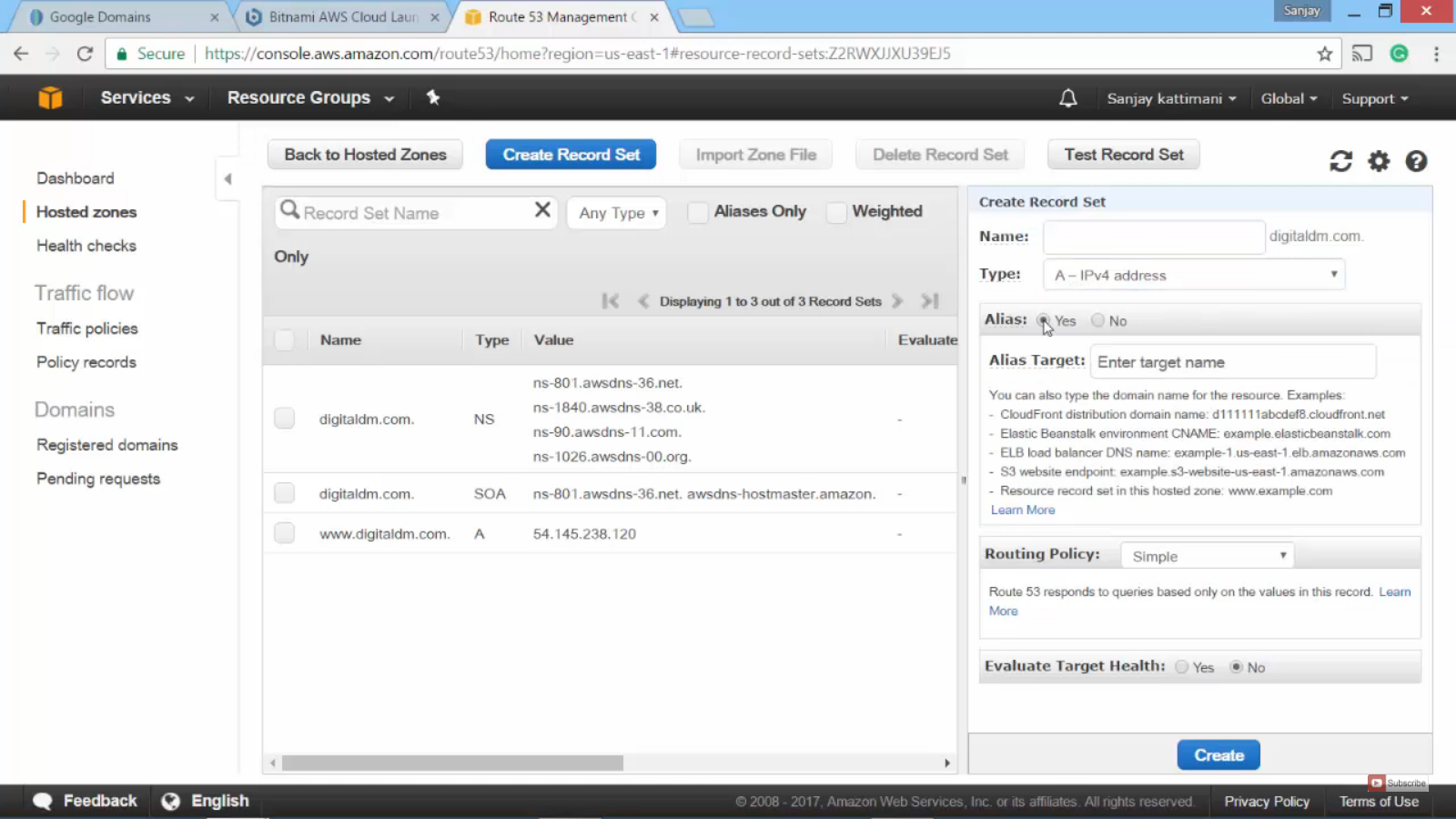
Route53 of Amazon webservices is used for all hosting/Routing related needs. This video explores various options for setting up your domain name servers, how to redirect it to AWS and other settings inside AWS to make it redirect to your content on AWS. 
In this example i am demonstrating how to redirect your domain to a simple html page stored on AWS, process is the same even if you are redirecting to any app hosted on Amazon web servervices.

Tuesday, January 17, 2017

Talend Project - Child jobs, Functions and Variables

This concluding part of Talend project video explores creating sub/child jobs, how to pass data between the two and different strategies to share the data.
Code in subroutines
// Code from https://www.youtube.com/watch?v=a7-HUU4js9E
package routines;

public class formatEmails {

    public static String formatEmail(char oldRating, char newRating, String typeOfRating) {
       String fEmailText="";
    if (newRating>oldRating) {
    fEmailText=fEmailText+""+typeOfRating +" rating reduced from " +Character.toString(oldRating) +" to "+Character.toString(newRating)  +"
" ;
        }
    if (newRating
    fEmailText=fEmailText+""+typeOfRating +" rating improved from " +Character.toString(oldRating) +" to "+Character.toString(newRating)  +"
" ;
        }
    return fEmailText;
    }
}


It also explores subroutines/functions that helps you reduce the code and modularizes it. 


Check out the detailed video - https://www.youtube.com/watch?v=a7-HUU4js9E

tjavarow component code
/* -- Code from https://www.youtube.com/watch?v=a7-HUU4js9E ---- */ 
String wholepage;  
String ratings;
wholepage=input_row.document.toString(); 
int pos=wholepage.indexOf("composite_val"); 
ratings=wholepage.substring(pos,pos+250).replaceAll("[\\[\\]\"]", "").replaceAll(" \n", " ").replaceAll(" composite_val_vgm","");    String allratingsonly="";
String[] splitratings = ratings.split("composite_val>"); 
int i=0;
context.EmailText=context.EmailText+"

Ratings for : " +context.stock +"
" ;


 for (String eachratingrow : splitratings) 
  {    
   if (eachratingrow.length()>0)  
    { 
  
   if (i==0){  
     output_row.z_growth_rating=Character.toString(eachratingrow.charAt(0));   
        context.EmailText=context.EmailText+formatEmails.formatEmail(input_row.growth_rating.charAt(0), eachratingrow.charAt(0), "Growth");
   }    
   if (i==1)
   {
    output_row.z_momentum_rating=Character.toString(eachratingrow.charAt(0));   
       context.EmailText=context.EmailText+formatEmails.formatEmail(input_row.momentum_rating.charAt(0), eachratingrow.charAt(0), "Momentum");  
     }  
   if (i==2)
  
   output_row.z_value_rating=Character.toString(eachratingrow.charAt(0));   
   context.EmailText=context.EmailText+formatEmails.formatEmail(input_row.value_rating.charAt(0), eachratingrow.charAt(0), "Value"); 
   }     
   
   if (i==3)
   {   
    output_row.z_vgm_rating=Character.toString(eachratingrow.charAt(0));  
    context.EmailText=context.EmailText+formatEmails.formatEmail(input_row.vgm_rating.charAt(0), eachratingrow.charAt(0), "VGM"); 
    }  
    i++;
      
      }
  } 
output_row.EmailText=context.EmailText;
  /* - End of Code from https://www.youtube.com/watch?v=a7-HUU4js9E --*/

Saturday, January 07, 2017

Talend and Cassandra - Storing data and retrieving

This video explores saving data in Cassandra NoSql database. This video is a continuation of previous one. Apart from saving the data, it also discusses about quick tips on strategies for creating, storing and retrieving data in Cassandra.

Code used in the video

Select * from ss.stockratings where stock='TSLA' order by ratingtime desc limit 1;


Insert into ss.ratings(stock ,ratingtime,id,growth_rating,momentum_rating, value_rating,vgm_rating) values ('TSLA',dateof(now()),now(),'A','D','A','F');

CREATE TABLE ss.stockratings (
 id uuid,
 stock text,
 ratingtime timestamp,
 growth_rating text,
 momentum_rating text,
 value_rating text,
 vgm_rating text,
 PRIMARY KEY ( stock, ratingtime,id)
);

Thursday, January 05, 2017

Talend Project - Send mail (tSendMail component)

Talend's tSendMail component can be used to send HTML formatted emails. this Video demonstrates framing a HTML formatted text using the project we were working on.

This is the code that we used in tJavaRow component to extract the rating and create an email body that lists and changes compared to previous rating. Please follow the video get a complete understanding.

/* -- Code from https://www.youtube.com/channel/UCT3bqK2QL93j-IFYFYbvjWQ ---- */ String wholepage; String ratings; wholepage=input_row.document.toString(); int pos=wholepage.indexOf("composite_val"); ratings=wholepage.substring(pos,pos+250).replaceAll("[\\[\\]\"]", "").replaceAll(" \n", " ").replaceAll(" composite_val_vgm",""); //output_row.document = ratings; String allratingsonly=""; String[] splitratings = ratings.split("composite_val>"); int i=0;String EmailText="Ratings for : " +context.stock +"" ;for (String eachratingrow : splitratings)    if (eachratingrow.length()>0)   { allratingsonly=allratingsonly+";"+ eachratingrow.charAt(0)+"";     //allratingsonly=allratingsonly+eachratingrow+"**;";      if (i==0){  output_row.z_growth_rating=Character.toString(eachratingrow.charAt(0));  
  if ( eachratingrow.charAt(0)>input_row.growth_rating.charAt(0))  {   EmailText=EmailText+"Growth rating reduced from " +input_row.growth_rating+ " To "+ eachratingrow.charAt(0)+"
"; 
";   }
      if ( eachratingrow.charAt(0)    {   EmailText=EmailText+"Growth rating improved from " +input_row.growth_rating +" To "+ eachratingrow.charAt(0)+"
";  
";      }  }    if (i==1){ output_row.z_momentum_rating=Character.toString(eachratingrow.charAt(0));   if ( eachratingrow.charAt(0)>input_row.momentum_rating.charAt(0))  {   EmailText=EmailText+"momentum rating reduced from " +input_row.momentum_rating+ " To "+ eachratingrow.charAt(0)+"
"; 
";   }
      if ( eachratingrow.charAt(0)    {   EmailText=EmailText+"momentum rating improved from " +input_row.momentum_rating +" To "+ eachratingrow.charAt(0)+"
";  
";      }  }  if (i==2){ output_row.z_value_rating=Character.toString(eachratingrow.charAt(0));   if ( eachratingrow.charAt(0)>input_row.value_rating.charAt(0))  {   EmailText=EmailText+"value rating reduced from " +input_row.value_rating+ " To "+ eachratingrow.charAt(0)+"
"; 
";   }
      if ( eachratingrow.charAt(0)    {   EmailText=EmailText+"value rating improved from " +input_row.value_rating +" To "+ eachratingrow.charAt(0)+"
";  
";       }  }     if (i==3){   output_row.z_vgm_rating=Character.toString(eachratingrow.charAt(0));   if ( eachratingrow.charAt(0)>input_row.vgm_rating.charAt(0))  {   EmailText=EmailText+"vgm rating reduced from " +input_row.vgm_rating+ " To "+ eachratingrow.charAt(0)+"
"; 
";   }
      if ( eachratingrow.charAt(0)    {   EmailText=EmailText+"vgm rating improved from " +input_row.vgm_rating +" To "+ eachratingrow.charAt(0)+"
";  
";       }  }  i++;
    } 

output_row.EmailText=EmailText;/* - End of Code from https://www.youtube.com/channel/UCT3bqK2QL93j-IFYFYbvjWQ --*/


If you haven't visited this project from the beginning, Here is the first post about it in this blog - http://sanjaykattimani.blogspot.com/2016/12/talend-project-to-parse-webpage-zackscom.html

Saturday, December 17, 2016

Talend project to parse a webpage (Zacks.com)

Created another interesting Talend project over the weekend. This Talend job parses zacks.com webpage to extract zacks scores and then convert them to rows that can be used in other components. tHTMLParse compent use to parse the website is available in Talend's exchange (market place) for free. String manipulation consumed majority of my time on this project. I intend to extend this project in future


Here is the code that goes in tJavaRow component that extracts only ratings out of the whole page and returns a string of ratings separated by semicolon.

/* -- Code from https://www.youtube.com/channel/UCT3bqK2QL93j-IFYFYbvjWQ ---- */ 

String wholepage; 
String ratings; 
wholepage=input_row.document.toString(); 
int pos=wholepage.indexOf("composite_val"); 
ratings=wholepage.substring(pos,pos+250).replaceAll("[\\[\\]\"]", "").replaceAll(" \n", " ").replaceAll(" composite_val_vgm",""); 
//output_row.document = ratings; 
String allratingsonly=""; 
String[] splitratings = ratings.split("composite_val>"); 
for (String eachratingrow : splitratings) 
   if (eachratingrow.length()>0)
   { allratingsonly=allratingsonly+";"+ eachratingrow.charAt(0)+"";     //allratingsonly=allratingsonly+eachratingrow+"**;"; 
    } 
output_row.document=allratingsonly;
/* - End of Code from https://www.youtube.com/channel/UCT3bqK2QL93j-IFYFYbvjWQ --*/

Monday, November 28, 2016

Creating MEAN stack application using Bitnami launchpad in AWS

My earlier Harvard course on Bigdata Analytics had given me enough exposure on AWS (Amazon Web Services) and professional and personal curiosity on emerging technologies taught me enough about MEAN stack.  MEAN stack is a full stack development tool kit that includes javascript based techologies MongoDB, Express.js, Angular.js and Node.js.

I wanted to take this learning to next level by hosting a MEAN stack application on AWS instance. While self exploring some intricate details of configuring and using AWS, much of the documentation was scattered to address individual needs and I had to connect the dots to meet my needs. Some of the documentation was old and some of the screenshots were obsolete. I decided to make a video along the way so that people who look for such information also get to learn. So here is the video of Creating MEAN stack application using Bitnami launchpad in AWS


I intend to do further videos explaining about other parts such as how to connect to the newly created VM, using Rockmongo, etc

Feel free to ask any related questions by leaving comments below this post or comments in youtube video page.

Saturday, February 07, 2015

Big Data Analytics at Harvard Extension School


Quest for upgrades in technologies and skills are indispensable traits in software field. Although it was my impulsive decision to join this course, fortunately everything worked out very well to start the studies at Harvard extension school in Boston, Massachusetts. Big data analytics subject that a friend had enrolled intrigued me as I have been thinking of learning about this subject for a long time. Big data also aligns very well with my existing knowledge of over 15 years of Business Intelligence, ETL and databases related experience.

I have been working on Healthcase analytics for over 3 years and it seemed like a best fit course coupled with the thirst to learn were all solved by this course.
Here is my project that i presented at the end of the course. It was one of the very few projects selected to be presented at Harvard to all our class.


This course instantly prepared me for the next logical shift in my career and as a result of all the curiosity, I ended up creating a BigData Technologies Youtube channel - https://www.youtube.com/channel/UCT3bqK2QL93j-IFYFYbvjWQ  to share my technical explorations.


Thursday, November 20, 2014

Wish list for Software Systems integration in every country

Recently I visited RMV in Watertown, MA for getting my driving license updated. They all did their job as best as possible. Being an Integration Consultant, every time I visit any government agency like this, I keep thinking about this.

They all have every bit of information already about me in their (at least one of their) systems. WHY DO THEY ASK ME TO FILL THESE SAME QUESTIONS IN EVERY FORM?
They waste
  • My time in finding the information, filling, correcting, printing, taking time out of my office hours 
  • Govt agency's time in validating every details of hand written (with human errors) applications, providing facilities for.
  • National resources - Infrastructure for buildings etc.
My wish list for future (you would think that this is right out of a sci-fi movie) is
  1. When you walk in to airports, No visa, passport, ticket or any other document to be presented instead scan my iris, palm or an embedded device. Do not ask me the purpose of visit, you must already be knowing it with verified documents (air ticket, valid visa and passport)
  2. Our medical records
    1. They should be shared by all physicians/clinics.
    2. I should not be filling all those forms again with detailed clinical history at every clinic.
  3. If I need to transfer my driving license/car registration etc, System should already know that i moved from Texas to Massachusetts and should present me a confirm button with every update its going to do namely,
    1. Insurance update
    2. New driving license issued by the state
    3. Car and other vehicles registration transferred 

There are numerous use cases like these where we can automate
Although these might sound like next to impossible task given the different agencies involved that govern the data, but we already have most of the information stored in multiple systems and its not an impossible task to integrate these. 


Thursday, March 20, 2014

SoapUI - A powerful web services testing tool

Recently I happened to Review/Test a few web services implemented for one of my client. 
SoapUI Pro

SoapUI is the defacto standard for validating webservices. Apart from technical deliverables, I also got to evaluate the product and compare it with free version. I downloaded free version and Pro (14 days evaluation) and was pleasantly surprised at the advancements and ease of use. I developed webservices a few years ago and hardly any useful tool was there to test it. 

SoapUI Pro interface 


Some of the notable features I liked and used are

  • Dynamic Duo/The Editors - You can visually enter data rather than searching though XML and entering the data. I used this extensively and is a very neat feature. 
  • Point and Click Testing - Almost ready to test the webservices just with few clicks. You can click on the web service response xml contents and right click and few more clicks and SoapUI writes the xpath qeury and associated test case. Its that simple. 
  • Test Debugging - Helps creating test flows, other testing related constructs like conditional execution, looping etc. I mostly utilized connecting to DB (data source) and groovy script.
  • Data Sources - Provides options to connect to most popular data sources. You can write queries/get the data from these sources and then use use the data as part of inputs to your webservice calls or compare the data to validate the webservice response.
  • Multi-Environment Support - If you have multiple environments on which you need to do same webservice testing, this is a major timesaver. I created my own config file and imported those settings as project's properties. Client code, end points. connection string, user name and such commonly used strings were stored and the imported properties could be used in test cases as variables with a few clicks(Again I did not type any of these).
  • Reporting - Provides nice reporting of all test suites/cases executed with their status. You can also customize the template of reporting. I mostly created HTML reports as they were very easy to use and store but PDF, CSV and other formats are also available. 
  • The SQL builder - Sql builder allows you to visually choose the tables and build query, our huge database with few thousand schemas was too much for SoapUI . I preferred using my ready to use queries and it worked flawlessly.
  • Stop the Hackers - XML Bomb, sql injection, malformed XML and plenty of other ready to use test cases are available under security category  - Just few clicks away.  

SoapUI had plenty of other features but these were the features that I ended up using and was pleased with the self explanatory and user friendly interface.
You can take a look at their SoapUI : 12 reasons to go pro page for more details.


SoapUI also has a free version. Free version is very limited but lets you create your test cases with basic features.

Saturday, May 18, 2013

Adobe LightRoom


Tried Adobe LightRoom software today on some of  my not so beautiful looking Raw images (of course bluebonnet flowers and kids are always beautiful)
What a difference. 
 I always wondered at those blank skies in my images and now i know how to deal with them. Pictures from Heavenly Bokeh group on Facebook and references from a few friends there inspired me to install and try out these effects. Burning midnight oil was well worth it. 

Tuesday, March 06, 2012

Youtube is scanning your videos

Yesterday I uploaded a video on Youtube that I created with photos and used some background music that i downloaded from net. In an hour, Youtube sent the following email to me.


Dear sanjaykattimani,
Your video, RishabHomeVideo.m2ts, may have content that is owned or licensed by Yash Raj Films Pvt. Ltd..  No action is required on your part; however, if you are interested in learning how this affects your video, please visit the Content ID Matches section of your account for more information.
Sincerely,

- The YouTube Team
 © 2012 YouTube, LLC
901 Cherry Ave, San Bruno, CA 94066 

So whats Google/Youtube up to?
Youtube is scanning all the videos that you are getting uploaded and scanning for music that matches their video/audio library. In case it matches, sends out the above warning message. This is a smart way to reduce/fight copyright infringements.
May be this was part of Googles privacy policy changes. I didn't read them. Did you?

I feel this is the best for copyright owners as they are suppose to get their share. At the same time if they start going after users like us to collect royalty, we would rather drop those songs and use some general public licensed music. Or better, I may end up creating my own music?? :)


Update 1/22/2017 - Noticed that YouTube still lets you continue to upload your videos, It certainly does not let you monetize (Earn on the ads) your videos. Its not hard to find royalty free music for most of your compositions though.


Tuesday, May 24, 2011

Spamming gets innovative.

Spammers Hakckers keep finding new and innovative ways to reach out to the masses. Since facebook has been immensely popular social network, it becomes vert attractive media for spammers. It also seems to be very easy to convince users to click a few buttons and steal all your data. They also post links on your friend's walls to attract more visitors.


Found a couple of my innocent friends posting these materials again and again.
How do you safeguard youself?
  • Dont click on any link that you do not know or is suspicious.
  • If any application asks you to approve/join/like do not do it unless you know the website/link
  • They will have very attractive images/text - Eg. Osama bin Laden's uncensored pictures. If its too good to be true, it may not be safe link.

What do they get by spreading these kinds of links?
Any of the following
  • Viral marketing - Website may be trying to make some product/website popular
  • Stealing your details - They may be collecting your name, geographic location phone etc to sell it further.
  • Stealing your id and passwords .
So please safeguard our accounts and share the good messages/links/videos with your friends. Do waste your and your friend's time and energy by clicking the wrong links.
Happy socializing.

Thursday, May 19, 2011

QR Codes

Do you know what is QR Code?
A QR code (short for Quick Response) is a specific matrix barcode (or two-dimensional code), readable by dedicated QR barcode readers and camera phones. The code consists of black modules arranged in a square pattern on a white background. The information encoded can be text, URL or other data.


Was checking a barcode reader and found that app that i was testing can read QR codes so this was it.
Here is a QR code of my Kannada greetings site.

These are easily readable by most smartphones with camera by installing small app.